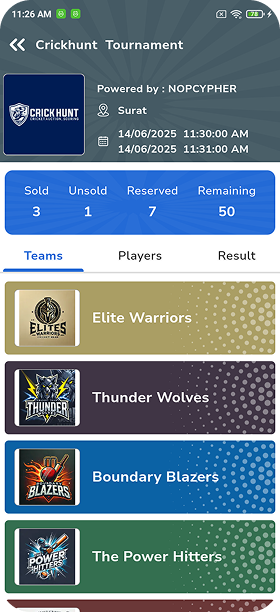





Most of this confusion comes from running the player auction manually – on paper, WhatsApp groups and spreadsheets that do not talk to each other. A cricket auction platform for local leagues fixes this by putting player registration, team budgets, bidding and player allocation in one place. CrickHunt is one such platform, built for Indian tournament organisers who run anything from a box cricket league to a corporate tournament.
This guide gives you a complete cricket auction checklist – from finalising your format to downloading final squads – plus an interactive checklist you can tick off as you prepare.
What Is a Cricket Auction Platform?
A cricket auction platform is online cricket auction software that lets organisers register players, give each team a fixed budget (purse), run live bidding and allocate players to teams – with every bid, purse balance and squad recorded automatically.
Instead of an anchor tracking numbers on a whiteboard, the platform shows the current player, the highest bid and each team's remaining purse in real time. Team owners can bid from their own devices, and the organiser gets a clean record at the end.
What CrickHunt's auction module covers
- Player registration through a shared link, with profile, photo and playing role
- Team and player management – squads, categories and captains
- Remote bidding for team owners from a phone or laptop
- Live purse tracking, including category-wise purse rules
- An unsold-player pool you can reopen during the auction
- Downloadable squads, purse summaries, player details and bid history
Why Do Local Cricket Leagues Need an Auction Platform?
Local cricket league management usually depends on a small volunteer team. An auction platform takes the error-prone arithmetic and record-keeping off their hands, so they can focus on running a fair, lively event.
1. Digital player auction management
Run the full cricket player auction from one dashboard – current player, bids and sold status – instead of juggling paper slips and spreadsheets.
2. Remote bidding from a phone or laptop
Remote bidding for cricket auctions means team owners who cannot reach the venue still take part – from home or on the move.
3. Team purse tracking
Every team's remaining budget updates as players are sold, so no owner overspends and nobody argues about the numbers later.
4. TV-style live auction overlays
Show the player, live bid and purse on a projector or a YouTube Live stream, giving a local auction a broadcast-style feel.
5. Downloadable squad lists, purse summaries, player details and bid history
After the hammer falls, download the records you need to publish squads, settle disputes and plan fixtures.
Complete Cricket Auction Setup Checklist
Work through these ten steps in order. Most auction-day problems can be traced back to a skipped step here.
STEP 01Finalise Your Tournament Format
Your format decides how many players each team needs, which in turn decides budgets and base prices. Lock it before you open registration.
- Fix the number of teams
- Set squad size – minimum and maximum
- Choose overs, ball type and match format
- Decide league, knockout or group stage
TakeawayTeams × squad size = the minimum number of verified players you need.
STEP 02Create Your Teams and Set Their Budgets
Every team should start with the same purse unless your rules say otherwise. Agree on budgets with all owners in writing before auction day.
- Confirm team names and owners
- Set a fixed purse for each team
- Decide category-wise spending limits, if any
- Note captains or icon players retained before bidding
TakeawayLeave enough purse for a team to fill its minimum squad at base prices.
STEP 03Register and Verify Players
A clean player pool is the foundation of a fair auction. Collect registrations through one channel and verify every entry before it goes live.
- Share one registration link
- Collect name, photo and playing role
- Remove duplicate and incomplete entries
- Confirm eligibility and availability
- Group players into categories
TakeawayCrickHunt supports registration via a shared link and bulk player import, so you can start from one list.
STEP 04Decide Player Base Prices and Bidding Rules
Rules that are written down and shared in advance prevent most auction-night arguments. Keep them short and easy for every owner to understand.
- Set a base price for each category
- Fix bid increments
- Define the player or category order
- Agree how unsold players will be handled
- Share the rule sheet with every owner
ReminderGet every owner to acknowledge the rules before the first bid.
STEP 05Configure Your CrickHunt Auction
Now transfer your decisions into the cricket auction software. Enter everything once, carefully, and avoid last-minute edits.
- Add teams, owners and purses
- Import or approve the player list
- Set categories and base prices
- Set up overlay branding and sponsor slots
- Share bidding access with each owner
TakeawayChoose the plan that matches your team count – see the pricing section below.
STEP 06Test the Auction Before Auction Day
A short practice auction exposes login issues, wrong purses and display problems while there is still time to fix them.
- Run a mock auction with a few players
- Check every owner can log in and bid
- Test the projector, overlay and stream
- Reset test data before the real event
ReminderTest at the venue, on the venue's internet, if you can.
STEP 07Prepare the Auction Team
Even with software, you need clear roles. One person should own each job so nothing falls through the cracks during live bidding.
- Auction anchor or auctioneer
- Console operator for the platform
- Coordinator for remote owners
- Display and stream in-charge
TakeawayBrief the team with the rule sheet and a run order an hour before the start.
STEP 08Conduct the Auction
Stick to the published order and rules. Keep the pace steady so owners have time to think, but not so slow that the room loses energy.
- Announce the rules once more before starting
- Follow the agreed player or category order
- Keep purses visible on screen
- Move unsold players to the unsold pool
- Reopen the unsold pool at the agreed time
ReminderDo not change rules mid-auction, even if a team requests it.
STEP 09Verify the Final Squads and Download Records
Before anyone leaves, confirm every squad with its owner. Records you download now will save you from disputes later.
- Read out each final squad
- Check squad sizes meet the minimum
- Download squad lists and purse summaries
- Save player details and bid history
TakeawayKeep a copy of the bid history – it answers any "who bought whom" question.
STEP 10Prepare for Matches After the Auction
The auction is the start, not the end. Use the momentum to lock fixtures and logistics while owners and players are still engaged.
- Publish final team lists
- Share fixtures and venues
- Assign scorers and officials
NextSee post-auction tournament preparation below.
Your Cricket Auction Checklist
Tick each task as you complete it. Your progress updates instantly.
How CrickHunt Helps Local Cricket League Organisers
Here is how common auction requirements map to what CrickHunt's online cricket auction platform offers, based on its official auction page.
| Auction requirement | How CrickHunt helps |
|---|---|
| Owners who can't attend in person | Remote bidding – team owners bid using a phone or laptop. |
| Accurate budgets | Team purse tracking shows each team's spend and balance live, with category-wise purse rules. |
| A professional look on screen | Live auction overlays for YouTube Live and a full-screen big-display mode for the venue projector. |
| Visibility for local sponsors | Sponsor screens – sponsor slots and rotations on overlays and the dashboard. |
| Players who go unsold | Unsold-player pool management – unsold players can be brought back when the pool is reopened. |
| Clear records afterwards | Downloadable squad lists, purse summaries, player details and bid history. |
CrickHunt Cricket Auction Pricing
Cricket auction pricing on CrickHunt is set per auction, based on how many teams take part.
| Plan | Team limit | Price per auction |
|---|---|---|
| StandardFree | Up to 2 teams | Free |
| Silver | Up to 4 teams | ₹1,500 |
| Gold | Up to 7 teams | ₹2,000 |
| Platinum | Up to 11 teams | ₹3,000 |
| Diamond | Up to 17 teams | ₹4,500 |
| Elite | Up to 30 teams | ₹6,000 |
Prices, plan features and terms can change, and plans may not all include the same features. Please check the current CrickHunt pricing and plan terms before you book your auction.
Common Mistakes to Avoid
Unverified player lists
Duplicates and ineligible players cause disputes once they are sold. Verify before you publish.
Unclear team budgets
If owners are unsure of their purse or category limits, bidding stalls and arguments start.
Changing rules midway
Any mid-auction change looks unfair to someone. Finalise rules beforehand and stick to them.
Skipping the practice auction
Login and display issues discovered live waste time and energy. A short test run avoids most of them.
Poor handling of unsold players
Decide in advance when the unsold pool reopens and at what price, so every team gets a fair chance.
Missing final auction records
Without downloaded squads and bid history, settling questions later becomes guesswork.
No backup plan for technical interruptions
Keep a mobile hotspot, a charged spare device and a printed player list ready in case the internet or power drops.
Post-Auction Tournament Preparation
Good cricket tournament management software helps beyond auction night. Once squads are final, move quickly on these next steps:
- Publish final team lists – share the downloaded squads with owners and players.
- Prepare match fixtures – build the schedule around your chosen format.
- Confirm venue and match timings – lock grounds, turf slots and reporting times.
- Assign scorers and match officials – brief them on rules and the scoring method.
- Organise result communication – decide how scores and standings will be shared with teams.
Scoring with CrickHunt
BETACrickHunt also has a scoring system for ball-by-ball scoring, currently labelled beta. Because it is still in beta, try it on a practice match before relying on it for important fixtures. See CrickHunt quick scoring (beta).
Frequently Asked Questions
What is the best cricket auction platform for local leagues?
The best platform is the one that fits your format, team count and budget. Look for remote bidding, live purse tracking, unsold-player handling, auction overlays and downloadable records. CrickHunt is a cricket auction platform for local leagues that offers all of these.
Can team owners bid remotely on CrickHunt?
Yes. Team owners can bid remotely using a phone or laptop, so they can take part from the venue, home or anywhere else.
Can CrickHunt manage unsold players?
Yes. Unsold players move to an unsold pool, which can be reopened during the auction to bring players back for bidding.
Can I download team lists after a CrickHunt auction?
Yes. You can download full squad lists, purse summaries, player details and bid history after the auction.
How much does CrickHunt auction software cost?
Pricing is per auction and depends on the number of teams. The Standard plan is free for up to 2 teams, and paid plans range from ₹1,500 (Silver, up to 4 teams) to ₹6,000 (Elite, up to 30 teams). Prices and terms can change, so check the current CrickHunt pricing.
Can I use CrickHunt for a school or college cricket tournament?
Yes. The same setup works for school and college tournaments – create teams, register students and run the auction. CrickHunt's auction page also mentions an offer for school, class and college tournaments; confirm current eligibility on the pricing page.
Does CrickHunt support auction overlays and sponsors?
Yes. CrickHunt offers a stream-ready overlay for YouTube Live, a full-screen big-display mode for the venue projector, and sponsor slots on overlays and the dashboard.
Does CrickHunt also provide cricket scoring?
CrickHunt has a ball-by-ball scoring system that is currently labelled beta. Test it on a practice match before using it for important fixtures. Learn more about CrickHunt quick scoring (beta).
How do I prepare for a local cricket auction?
Finalise your format, create teams and budgets, register and verify players, set base prices and bidding rules, configure the platform, run a practice auction and brief your auction team. Then conduct the auction and download the final records.
Where can I explore CrickHunt's cricket auction platform?
You can see all auction features, including remote bidding, overlays and downloads, on the CrickHunt auction features page.
Conclusion: Prepare Early, Bid Smoothly
A smooth auction is mostly decided before auction day. Finalise your format, set clear team budgets, verify your player list and publish your bidding rules early – then the live event becomes the exciting part, not the stressful part.
A cricket auction platform for local leagues like CrickHunt brings registration, remote bidding, purse tracking, overlays and final records together in one place. Explore CrickHunt's auction features, compare the current auction plans, and use the checklist above to get your league ready.