




A cricket auction is where a tournament's teams stop being just names on a fixture list and start being squads — built player by player, bid by bid, inside a budget that can't be broken. Get the planning right and auction day runs itself: players called, bids placed, squads filled, everyone moves on to the cricket. Get it wrong, and you're arguing about a budget overspend at 11 p.m. with half the player pool still unsold.
Most organizers don't fail because they lack cricket knowledge. They fail because the auction was never actually designed — no agreed base prices, no bid increment rule, no single source of truth for who's been sold to whom. If you've tried to run one from a shared Excel sheet and a WhatsApp group, you already know how quickly "who has the highest bid" turns into a five-minute argument.
This guide walks through the entire process in order: choosing a format, registering players, setting squad sizes and budgets, defining base prices and bidding rules, preparing your auction team and dashboard, running a test auction, and finally conducting the auction itself. Along the way, we'll use one clearly-labelled worked example throughout, plus a real, currently public auction from CrickHunt to show what the numbers actually look like in practice.
Quick Answer: The 12-Step Cricket Auction Process
If you only have two minutes, here's the whole workflow. Each step is covered in full detail below.
What Is a Cricket Auction?
A cricket player auction is the process by which competing teams bid for players to fill their squads ahead of a tournament or league season, instead of players being fixed to a team in advance. Each team starts with a budget, and an auctioneer puts players up for bidding one at a time until every squad is complete.
A few terms come up constantly, so it's worth defining them early:
| Term | What it means |
|---|---|
| Base price | The minimum amount a player can be bought for — bidding can never start below it. |
| Bid increment | The fixed step by which each new bid must raise the previous one. |
| Final bid price | The last accepted bid when no team raises further — the price the player is sold at. |
| Sold | A player bought by a team at the final bid price. |
| Unsold | A player who receives no bids at their base price. |
This is different from a player draft, where teams take turns picking from the pool at no cost and there's no competitive bidding. Auctions are more dramatic and more commercially interesting (sponsors love a bidding war), but they need noticeably more planning than a draft does.
Decide the Cricket Auction Format
Before touching budgets or player lists, decide how the bidding itself will physically happen. This single decision shapes almost everything else — venue, technology, and how team owners participate.
Live Player Auction
Players are introduced one by one in a room, teams raise paddles or hands in real time, and an auctioneer manages the pace of bidding until a final bid is confirmed for each player. This is the classic, high-energy format — closest to what fans see in franchise cricket auctions on TV.
Online Cricket Auction
Teams participate digitally instead of being physically present. Player information, current bids, and remaining budgets are displayed on a shared screen or dashboard, and team representatives place bids from their own device. This works well when team owners are spread across different cities and can't all travel to one venue.
Hybrid Auction
A physical auction room runs the show — auctioneer, stage, a big screen — while a digital system manages the data underneath: player queue, bid tracking, and budget updates. Some team owners bid remotely from mobile or laptop while others sit in the room. This is the most common setup for mid-to-large tournaments that still want the theatre of a live event.
Better suited to
- 2–4 teams, one venue, all owners present → Live
- Owners spread across cities/countries → Online
- 7+ teams wanting live energy + accuracy → Hybrid
Worth checking before you choose
- Internet reliability at the venue
- Whether all team owners have a smartphone or laptop
- Whether you need live-streaming for sponsors or fans
Register and Organize Players
Every auction runs on player data, so this step deserves more time than organizers usually give it. At minimum, collect:
- Full name and contact information
- Playing role (batsman, bowler, all-rounder, wicketkeeper)
- Batting style and bowling style
- Playing experience or past team history
- Player category (see below)
- Base price for that category
- Availability across the tournament dates
- Recent playing statistics, if available
Exactly which fields are mandatory depends on how your tournament is set up — some organizers keep it simple with just name, role and category; others collect detailed stats for auction commentary. Whichever platform or spreadsheet you use, decide your required fields before registration opens, not halfway through it.
Create Player Categories
Categories group players by role or status so bidding stays organized and base prices stay fair. Common categories used across cricket auctions include:
- Batsman, Bowler, All-Rounder, Wicketkeeper
- Local player vs. outstation player
- Experienced player vs. emerging/junior player
Public CrickHunt auction pages show category structures actually used by organizers on the platform. The SNBCPL Session 1 auction lists a straightforward Batsman / Bowler / All-Rounder style breakdown, while other listed auctions add categories like Captain or Sponsor depending on the tournament's own rules — categories aren't fixed by the software, they're defined by each organizer. View live auctions
Set the Number of Teams and Squad Size
Decide the number of teams first, then work out how many players each squad needs — playing XI plus a reasonable bench of substitutes and reserves.
Say a tournament has 8 teams, and each team needs a squad of 15 players (11 playing + 4 reserves). That's 8 × 15 = 120 player slots to fill across the auction. This is a hypothetical illustration only — your own team count and squad size should be set by your tournament's own format and player pool, not copied from this example.
Set a minimum and maximum squad size per team, not just a target. A minimum stops a team from finishing the auction understaffed if bidding goes badly for them; a maximum stops one team hoarding players and leaving nothing for the rest. Also decide, in advance, how many of those slots are locked in as playing XI versus reserve/substitute positions — this affects how organizers set base prices for lower-tier categories later.
Set the Team Budget
Every team needs a fixed starting budget known to everyone before bidding begins. Beyond the headline number, decide:
- Whether every team gets an equal starting budget, or budgets vary by team history/sponsorship
- Whether there's a minimum amount a team must keep in reserve for remaining squad slots
- What happens to any unused budget once a team's squad is full
Illustrative example — not CrickHunt data: Team A starts with a ₹1,00,000 budget. After buying six players, it has spent ₹72,000, leaving ₹28,000 for its remaining slots.
The reason this needs to be tracked in real time — not tallied up afterward — is simple: a team that doesn't know its live remaining budget can accidentally bid itself into a corner, winning one expensive player and then being unable to afford the minimum squad size. Whatever tool you use, remaining budget should be visible to every team, every bid, not calculated after the fact.
Decide the Player Base Price
The base price is the minimum a player can be bought for — bidding for that player can never start below it. Organizers typically set different base prices per category, reflecting experience and expected demand.
Illustrative example — not CrickHunt data:
Base prices don't have to be currency at all. On CrickHunt's public auction pages, some tournaments run on a points system instead of rupees — the SNBCPL Session 1 auction records its most expensive player at "45 Lakh Point," not ₹45,00,000, showing that organizers can define the bidding unit however suits their tournament. See the live auction
A good tiering exercise: rank your player pool roughly by experience and role scarcity (good all-rounders and wicketkeepers are usually in shorter supply), then set 3–5 price tiers. Too many tiers slows the auction down; too few and every player in a category gets bid up to the same range regardless of ability.
Define the Bidding Rules
These are recommended tournament practices, not a fixed rulebook enforced by any specific software — write your own version down and share it with every team before auction day.
| Rule | What to decide |
|---|---|
| 1. Starting bid | Always the player's base price — no exceptions. |
| 2. Minimum bid increment | The smallest step a new bid must raise the previous one by. |
| 3. Maximum team budget | No team may bid beyond its remaining balance. |
| 4. Who can place bids | One authorized representative per team, clearly identified. |
| 5. Bid timing | How long a player stays open for bidding before being called sold. |
| 6. Bid confirmation | How the auctioneer signals a bid is locked in (call, gavel, on-screen confirm). |
| 7. Sold / unsold rules | What happens the moment bidding stops. |
| 8. Tie-breaking rules | How simultaneous or disputed bids are resolved. |
| 9. Re-auction rules | Whether and when unsold players come back up for bidding. |
| 10. Dispute resolution | Who has final say if teams disagree mid-auction. |
Print or share this list before the auction starts. Verbal-only rules are where most on-the-day arguments come from.
Set the Bid Increment
The bid increment is the fixed step each new bid must raise the last one by. Keep it simple and public — a variable or negotiable increment is one of the fastest ways to create disputes.
Illustrative example — not CrickHunt data: Base price ₹5,000, increment ₹500.
Real increments vary a lot by tournament and budget scale — some organizers step increments up as the price climbs (small steps early, bigger steps once a player passes a threshold) to keep bidding fast without letting it drag on for cheaper players. Whatever you choose, write it down as part of your bidding rules in Step 6, not as an on-the-spot auctioneer decision.
Establish the Auction Rules
Player Sold Rule
When bidding on a player stops and no team raises further within the agreed time, the auctioneer confirms the highest bidder, the player is marked sold, and that team's budget is updated immediately.
Unsold Player Rule
If no team bids at all — even at base price — the player is marked unsold. Decide in advance whether unsold players get a second pass later in the auction, or whether they're simply left for teams to sign outside the auction process.
Re-Auction Rule
Common approaches include: bringing all unsold players back after every category has had its first pass, or holding a single dedicated unsold-players round at the very end. Either is fine — the important part is deciding which one, publicly, before the auction starts.
Budget Violation Rule
No team should be allowed to place a bid that exceeds its remaining budget — including budget it needs to keep in reserve for minimum squad requirements. This is exactly why real-time budget tracking (Step 4) matters: without it, a violation might not be caught until it's too late to undo.
Recommended practice, not a fixed rulebook: every rule on this page is a widely-used tournament convention. CrickHunt does not impose a single official rulebook — organizers configure categories, base prices, and budgets for their own tournament inside the platform.
Prepare the Auction Team
Auctioneer
Runs the pace of bidding, announces base prices, and confirms each sale.
Tournament Administrator
Owns the overall rules, resolves disputes, and has final say on edge cases.
Team Representatives
One authorized bidder per team — the only person permitted to place that team's bids.
Data Operator
Enters sold/unsold results and budget updates as they happen, keeping the dashboard accurate.
Technical Support
Handles connectivity, devices, and the display or streaming setup during the event.
Verification / Registration Team
Confirms player identities and eligibility before their name comes up for bidding.
Prepare the Auction Dashboard
An effective dashboard — whether it's a shared screen, a spreadsheet, or dedicated software — should show, at a glance:
- The current player up for bidding and their category
- Base price and current highest bid
- Which team is currently the highest bidder
- Every team's remaining budget, updated live
- Remaining squad slots per team
- Sold / unsold status as it happens
- A running bid history for the current player
This is where CrickHunt's verified capabilities are directly relevant. The platform provides a Team Owner View, so team owners can follow player profiles and points live on their own mobile device, alongside remote bidding that lets a team owner place bids from a mobile phone or laptop rather than needing to be physically at the auctioneer's table. See CrickHunt's platform
Whatever system you use, the goal is the same: nobody should have to ask "wait, what's our budget right now?" mid-auction.
Run a Test Auction Before the Event
A short mock auction — even 15–20 minutes with a handful of dummy players — surfaces problems while there's still time to fix them. Cover:
Treat anything that breaks in the test as a gift — it's a problem you found before it cost you an actual auction.
Conduct the Cricket Auction
On the day, the workflow repeats for every player in the pool:
Multiply this loop by however many players are in your pool, and you can see why manual coordination gets harder as the numbers grow — the SNBCPL Session 1 auction referenced earlier ran this exact loop across 80 players and 10 teams. A digital dashboard doesn't change the rules of the process; it just removes the lag between "bid confirmed" and "everyone can see the updated budget," which is where manual auctions tend to slow down.
Common Cricket Auction Mistakes to Avoid
None of these are guaranteed to happen — but each one can increase the risk of a messy auction day if it isn't planned for.
Multiple Excel Sheets
Separate sheets for players, budgets, and results can drift out of sync, especially when more than one person is editing at once.
Manual Budget Tracking
Calculating remaining budget by hand mid-auction can increase the risk of a team overbidding before anyone notices.
Duplicate Player Records
The same player registered twice can cause confusion about who's actually still available.
Unclear Bidding Rules
Rules agreed verbally, not in writing, tend to be remembered differently by different teams.
Missing Player Information
Gaps in role, category, or base price force last-minute decisions in front of a room full of teams.
No Backup Plan
A single point of failure — one laptop, one internet connection, one spreadsheet — can stall the entire event.
Poor Communication
Team owners who don't know the rules or schedule in advance arrive unprepared, which slows everyone down.
No Auction Records
Without a saved record of sold/unsold results, resolving a post-auction dispute becomes guesswork.
How Cricket Auction Software Makes the Process Easier
Purpose-built auction software generally helps with the same handful of problems: centralizing player information in one place, tracking every team's budget in real time, running the actual bidding, and keeping a permanent record of sold, unsold, and re-auctioned players — instead of stitching that together across sheets, screenshots, and group chats.
That's the exact gap CrickHunt is built to close. It's described as an online player auction platform built specifically for cricket tournament organizers, aimed at removing the reliance on spreadsheets and manual tracking.
Explore CrickHuntRemote Bidding
Team owners can place bids from their own mobile or laptop rather than needing to be physically present at the auction table.
Team Owner View
Owners can follow player profiles and points live from their mobile device as the auction runs.
Live Streaming Overlays
Premium, TV-style overlays for the auction screen, useful for organizers who stream the event for fans or sponsors.
Sponsor Advertising
Sponsor advertisements can be shown directly on the auction screen — a way to give tournament sponsors visibility during the event.
Downloadable Auction Data
Organizers can download the auction's data afterward, rather than relying only on live records.
Real-Time Updates
Bid and budget information updates live as the auction progresses.
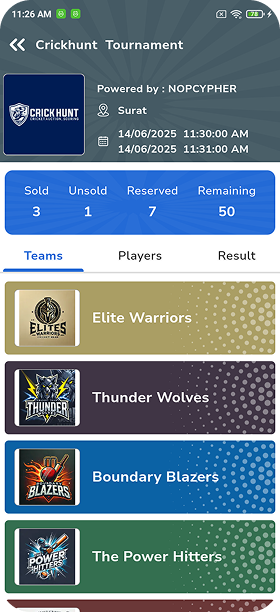
Real example: the SNBCPL Session 1 auction page shows exactly this kind of live tracking in practice — 80 total players, 19 reserved, 61 sold and 0 unsold at the time of writing, alongside a "Most Expensive Player" readout. That's the same sold/unsold/reserved breakdown described above, visible on a public, currently listed auction. View the auction page
Cricket Auction Checklist
A condensed version of everything above, in order:
Frequently Asked Questions About Cricket Auctions
How does a cricket player auction work?
Registered players are put up for bidding one at a time, starting at their base price. Teams bid against each other in fixed increments, and when no team raises further, the highest bidder wins the player at the final bid price. This repeats until every squad is filled or the player pool is exhausted.
How much budget should each cricket team get?
There's no fixed number — it depends on your player pool size, squad size, and base prices. A useful sanity check: the budget should comfortably cover the minimum squad size at base prices, with enough left over for teams to actually compete on the players they want. Most local tournaments give every team an equal budget.
How do you decide a player's base price?
Group players into 3–5 categories by experience and role scarcity, then set one base price per category — highest for the most experienced or in-demand players, lowest for emerging players. Some tournaments use points instead of currency; the tiering logic works the same way.
What are the basic cricket auction bidding rules?
At minimum: bidding always starts at the player's base price, every new bid must rise by the agreed increment, no team may bid beyond its remaining budget, and only one authorized representative per team may place bids. Write the full rulebook down and share it with every team before auction day.
What happens when a player receives no bids?
The player is marked unsold. Most tournaments bring unsold players back for a second pass — either after each category finishes or in a dedicated round at the end. Decide which approach you'll use, publicly, before the auction starts.
How many players should each team buy?
Set a minimum and maximum squad size, not just a target — typically a playing XI plus 3–5 reserves. The minimum stops a team finishing understaffed; the maximum stops one team hoarding players and starving the rest of the pool.
Can cricket auctions be conducted online?
Yes. Teams can participate fully online with bids placed from their own devices, or in a hybrid format where a live auction room runs the event while some owners bid remotely. Online and hybrid formats work well when team owners are spread across different cities.
How can cricket auction software help tournament organizers?
It centralizes player registration, tracks every team's budget in real time, applies bid increments automatically, records sold/unsold results, and keeps a permanent downloadable record of the auction — replacing the combination of spreadsheets, screenshots, and group chats that most manual auctions rely on.
Plan Your Cricket Auction the Smarter Way
Prepare your players, define your teams and squad requirements, set realistic budgets, agree clear bidding rules in writing, track bids and budgets as they happen, and run a short test before going live. That's the entire process — the same steps whether you're running it with a whiteboard or a dashboard.
Explore CrickHunt and Run Your Auction